LinkedIn Photo Requirements: Size, Crop, and Background Made Easy
Ever noticed how some LinkedIn profiles make you think, "Wow, this person conveys CEO energy," while others scream, "I took this selfie at a wedding after three glasses of champagne"?
Your LinkedIn photo is doing a lot of heavy lifting in those split-second first impressions. And while we all know content matters (your experience, skills, recommendations), let's be honest: that tiny circle with your face in it is the first thing anyone sees.
But here's the thing—LinkedIn has some very specific photo requirements that most people completely miss. In this blog article, I'm going to break it all down for you, from exact pixel dimensions to the subtle psychology that makes recruiters hit that "Connect" button.
Main Takeaway
A professional LinkedIn headshot significantly impacts how recruiters and connections perceive you—increasing profile views by up to 14x and connection requests by 9x. But you don't need an expensive photographer or complicated setup to nail it. With the right specifications and the right AI tools, you can create a professional LinkedIn headshot in minutes.
LinkedIn Photo Requirements: The Technical Specs (2025)
Let's start with the non-negotiable technical requirements that LinkedIn itself demands:
Size & Dimensions
- Optimal size: 400 × 400 pixels (perfect square)
- Minimum dimensions: 200 × 200 pixels (technically works, but looks terrible)
- Maximum file size: 8MB (but honestly, if your headshot is approaching 8MB, you've got bigger problems)
- Formats accepted: JPG, PNG, or GIF (but please, for the love of all things, no animated GIFs)
The Background Matters More Than You Think
LinkedIn doesn't actually specify background requirements, but data shows certain backgrounds dramatically outperform others:
Background Winners:
- Soft, neutral gray - The gold standard, improving profile views by up to 14% in A/B tests
- Light blue - Especially effective for finance professionals, consulting, and tech engineers (conveys trustworthiness)
- Slightly blurred office environment - For a more dynamic yet professional look
- Plain white - Clean but can be harsh with certain lighting
Background Losers:
- Pictures with other people cropped out (we can all see that phantom hand on your shoulder)
- Busy patterns that distract from your face
- Dark backgrounds that create stark contrast (unless you're in creative fields)
Don't be that person.
Lighting That Makes (or Breaks) Your LinkedIn Photo
Bad lighting is the #1 reason otherwise good photos fail to look professional. Here's what I've found works best:
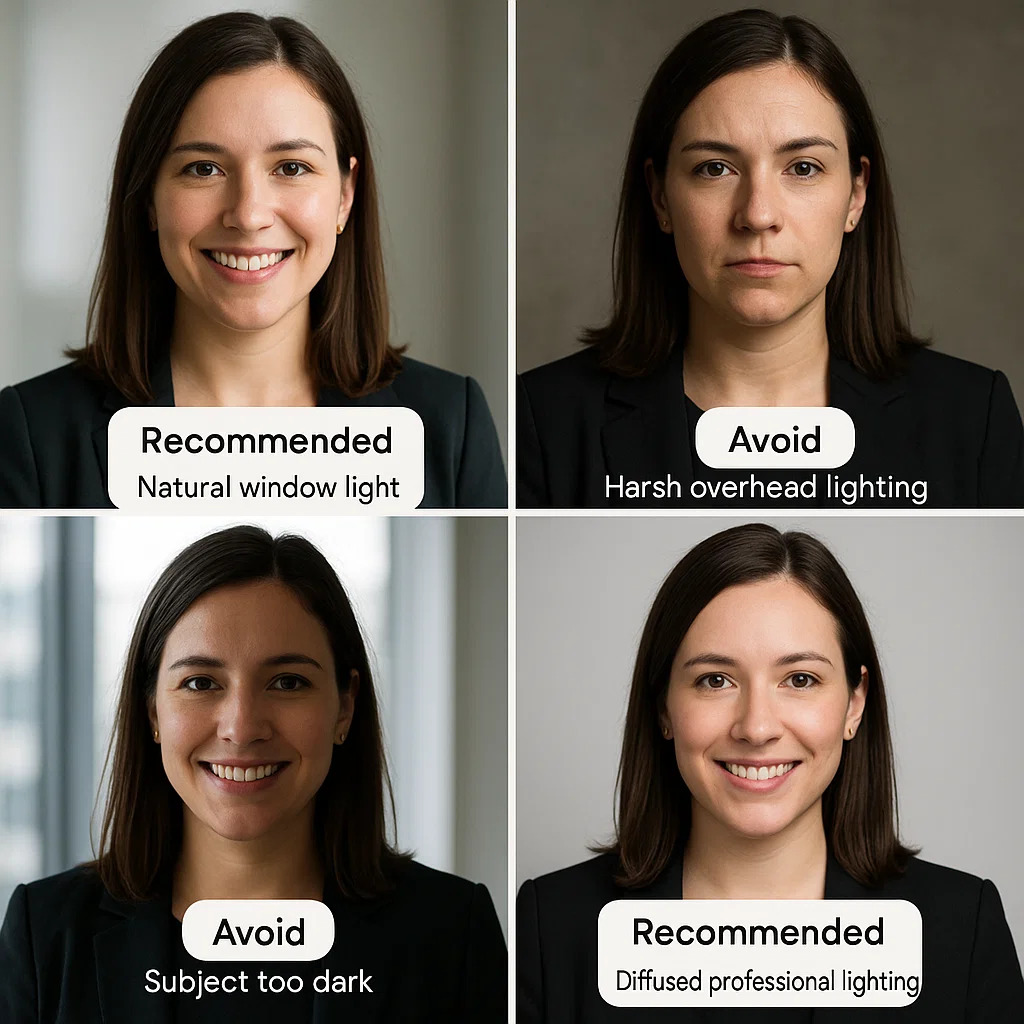
- Natural window light from the front or slight angle (never backlit!)
- Early morning or late afternoon golden hour (if possible)
- Avoid harsh overhead lighting that creates raccoon-eye shadows
The secret weapon? A simple catchlight—that tiny reflection of light visible in your eyes. It makes a massive difference in how "alive" and engaged you appear. Professional photographers obsess over catchlights because they know they're the difference between "looks great" and "looks slightly dead inside."
Common LinkedIn Photo Mistakes
After looking at thousands of LinkedIn profiles, I've spotted patterns of what makes photos fail. Here are the big ones:
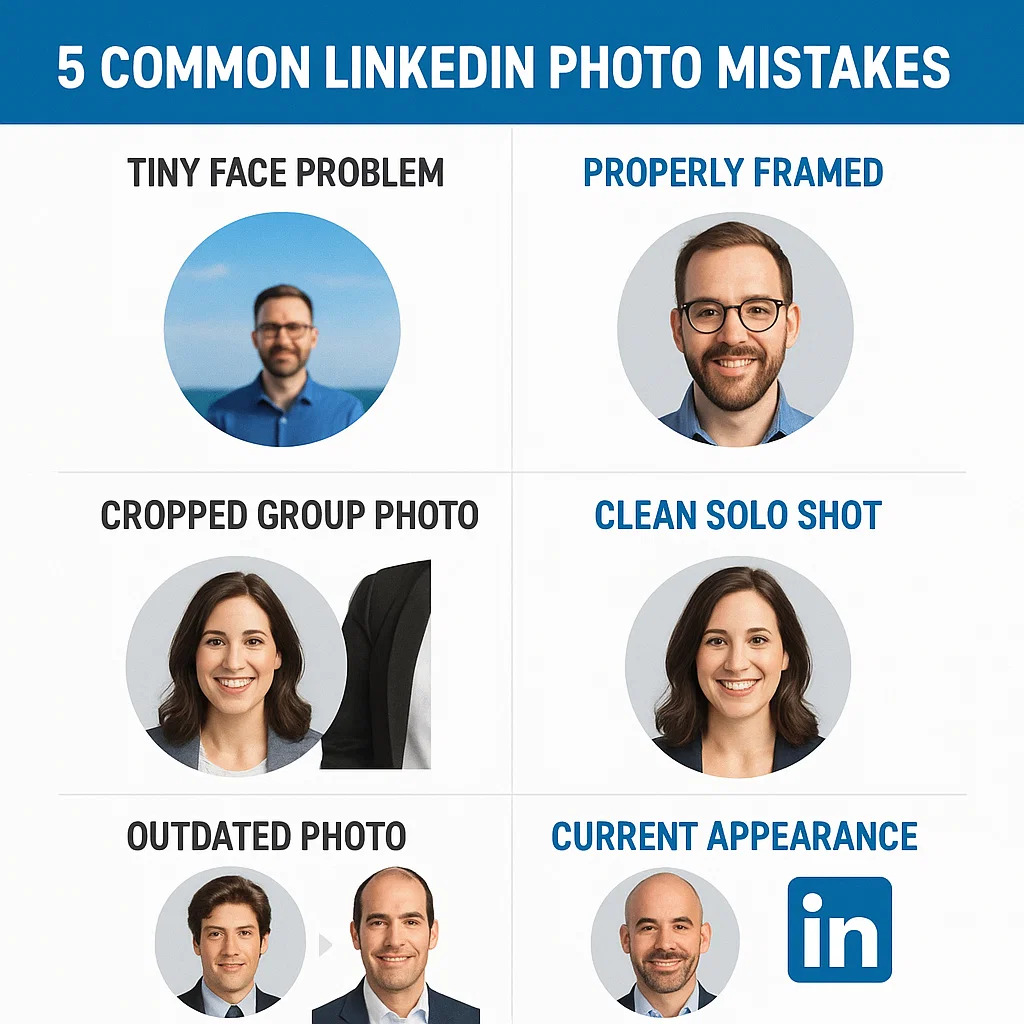
The "Tiny Face" Problem
When your face is too small in the frame, you appear distant and unengaging in LinkedIn's thumbnail-sized displays. Once your photo gets compressed into that little circle in search results, no one can even tell it's you.
Quick fix: Recrop your image with your face taking up about 60-70% of the frame.
The "Cropped From Group Photo" Fail
We can all see the mysterious floating hand on your shoulder or the awkwardly cropped person next to you.
Quick fix: Get a proper solo photo or use an AI tool like MyPicNow to generate a clean, professional headshot.
The "Time Traveler" Problem
Using a photo that's 5+ years ago. While tempting, this creates awkward moments when you meet people in real life.
Quick fix: Update your photo at least every two years, or whenever your appearance significantly changes.
How to Actually Get a Great LinkedIn Photo (3 Real Options)
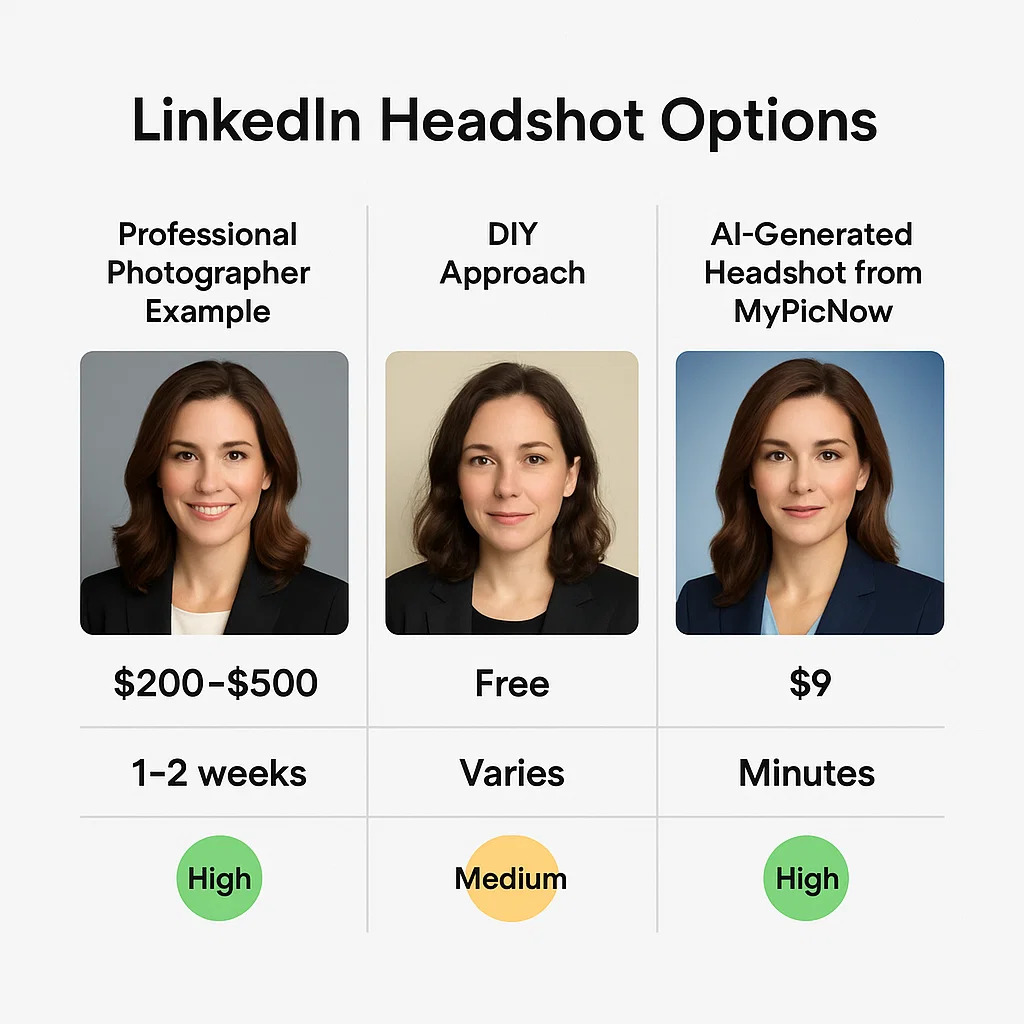
Option 1: Professional Photographer
Pros: Top-quality results, professional guidance, multiple options
Cons: Expensive ($200-500), scheduling hassle, can feel awkward
Best for: Executives, client-facing roles, people who genuinely enjoy photoshoots
Option 2: DIY Approach
Pros: Free, immediate, completely under your control
Cons: Usually looks... well, DIY
Reality check: Unless you have proper equipment, good lighting, and a friend who knows what they're doing, this often produces mediocre results
Option 3: AI LinkedIn Profile Photo Generator
Pros: Affordable ($19-30), instant results, multiple options to choose from
Cons: Requires decent selfies as input
Best for: Most professionals who want quality without the time/cost investment
I've tried all three approaches, and honestly, for most people, AI headshot generators hit the sweet spot of quality, cost, and convenience. The technology has improved dramatically in the past year.
MyPicNow specializes in creating photorealistic headshots that look exactly like you—just you on your best day, with perfect lighting and a professional background. Just upload a few selfies, and in about 8 seconds, you'll have LinkedIn-ready photos that actually look like you (not some weird AI approximation of a human).
The Psychology Behind Effective LinkedIn Photos
Understanding the subtle psychological triggers in profile photos can give you a serious edge:
- Direct eye contact increases trust perception by 30% according to a 2020 study
- A slight, authentic smile (not a forced grin) improves likability scores
- Solid, neutral backgrounds reduce cognitive load and keep focus on you
- Professional attire triggers automatic competence assumptions
Recruiters and hiring managers make these judgments in milliseconds—literally before their conscious brain even registers they're doing it. A LinkedIn study found that profiles with professional headshots receive 14 times more views and 36 times more messages than those without.
The LinkedIn Photo Checklist
Ready to optimize your LinkedIn photo? Use this quick checklist:
- Face centered and taking up 60-70% of frame
- Clean, neutral background
- Good lighting with no harsh shadows
- Recent and accurate representation
- Slight, natural smile
- No distracting elements or other people
Final Thoughts
Your LinkedIn photo creates an impression that either opens or closes doors—often before anyone reads a single word on your profile. The good news? Getting it right isn't complicated or expensive anymore.
Whether you opt for a professional photographer, improve your DIY setup, or use an AI generation tool like MyPicNow, following these specifications and guidelines will dramatically improve how you're perceived on the platform.
The return on investment is massive—a few minutes spent optimizing your photo can lead to more views, connections, and ultimately, better career opportunities.
👉 Generate your LinkedIn‑ready headshot in 8 seconds
FAQ
Q: How often should I update my LinkedIn profile photo?
A: At minimum, every 2 years, or sooner if your appearance changes significantly (new hairstyle, glasses, significant weight change, etc.). In client-facing roles, keeping it current is even more important.
Q: Is it worth paying for a professional photographer for LinkedIn?
A: If you're in an executive position, yes. For most professionals, AI-generated headshots now offer comparable quality at a fraction of the cost (and without the awkward posing sessions).
Q: Should my LinkedIn photo match my other social media profiles?
A: Not necessarily. Your LinkedIn photo should be more professional than your Instagram or Facebook photos, but still recognizably you. Consistency across professional platforms (company website, speaker bios) is more important.
Q: Can I use filters on my LinkedIn photo?
A: Subtle enhancement is fine, but obvious filters make you look unprofessional. Professional retouching should be invisible – fixing lighting and minor blemishes rather than changing your appearance.
Q: What's the biggest mistake people make with LinkedIn photos?
A: Using casual photos from social settings. The second biggest is poor cropping that makes your face too small when viewed in LinkedIn's interface, especially on mobile.